

Jason - Reshaping Investment Analysis Workflow - The Efficiency Multiplier of Full-Context AI and Markdown in Obsidian
The Unspoken Edge: Can Treating Markdown as AI's 'Mother Tongue' in an Obsidian Vault Deliver the Next 10x Leap in Investment Research Bandwidth?

Paradigm Shift in Deep Research: How AI and Obsidian Are Reshaping the Investment Analyst Workflow
For any investment analyst, the challenge in Deep Research is no longer the scarcity of information; rather, it is the bottleneck of information overload and processing efficiency. In this torrent of data, the quality and speed of research output are fundamentally determined by the ability to quickly and accurately pinpoint core insights and to systematize and structure fragmented knowledge. We observe that the tipping point for efficiency gains is occurring in the deep integration of knowledge management tools with AI assistants possessing full contextual awareness.
This article will dissect the construction logic of a high-efficiency research workflow: using Obsidian as the cornerstone, Markdown as the "mother tongue" of AI, and integrating the powerful AI assistant, Obsidian Copilot, to achieve an exponential expansion of personal research bandwidth.
I. Foundational Philosophy: Why Obsidian is the Ideal Vehicle for Knowledge Management in the Age of AI
The Core Problem: Why Can’t Traditional Knowledge Management Tools Meet the Demands of Deep Research?
The primary pain point of traditional applications (Apps) lies in "data lock-in," where a user's data assets are sealed within a specific ecosystem, making them difficult to migrate and challenging for third-party tools to utilize efficiently. The unique philosophy of Obsidian precisely resolves this fundamental conflict.
1. Data Sovereignty and Portability: File Over App
Obsidian's core tenet is "File Over App," meaning the file takes precedence over the application.
- Decentralization of Data Assets: Unlike mainstream software that stores data within internal application databases, Obsidian functions merely as a local Graphical User Interface (GUI) manager for folders and files residing on the user's computer.
- High Portability: This means users can move their entire Vault (knowledge base) to any device and open the raw files using Obsidian or any other compatible software. This guarantees users complete control and maximum flexibility over their data assets.
2. Linguistic Alignment: Markdown as the "Mother Tongue" of AI
If "File Over App" addresses the ownership of data assets, then the Markdown format resolves the intelligibility of those assets—a crucial factor for achieving AI-driven efficiency gains.
- Structured Plain Text: A Markdown file is essentially a plain text (TXT) file, but one equipped with clear structural markings (e.g.,
#for a first-level heading,##for a second-level heading). - Native AI Input: The majority of input data used during the training of AI models exists in the Markdown format. This "linguistic alignment" ensures that AI models can natively comprehend the text structure of Markdown, including heading hierarchy, lists, tables, and even image paths.
- The Underlying Logic of Efficiency: This compatibility ensures that when processing Obsidian notes, the AI can identify the information structure with extremely low friction and high accuracy, laying a solid foundation for subsequent Deep Research analysis.
II. Arming the Vault: Obsidian Copilot and Full Contextual Awareness
The Core Problem: How can a simple Markdown editor be armed into a fully functional research platform that achieves deep, full-context integration?
Built on the Electron framework, Obsidian boasts an open and massive plugin ecosystem. Through plugins, it can be extended from a note-taking app into a powerful research Integrated Development Environment (IDE). The emergence of Obsidian Copilot, in particular, defines a new standard for AI in knowledge management.
1. Full Contextual Awareness: Copilot's Key Differentiating Advantage
The main distinction between Obsidian Copilot and external AI models (such as GPT) or Microsoft Copilot is its ability to access and utilize the user's current complete context environment, which includes all notes, images, and file structures within the entire Obsidian vault.
- Project Mode: This mode allows users to fix a large contextual space. For instance, one can import a few books, dozens of reports, or the contents of an entire folder, enabling the AI to remember and reference this material throughout the entire conversation cycle.
- The current context size supports up to 1 million tokens, sufficient to accommodate the vast majority of complex research projects.
- Multimodal Input and Output: Copilot can process both text and image information simultaneously. When a user asks a question, the AI not only understands the text in the notes but also the content of the images within the vault. For output, it can accurately cite and display links to those images.
Figure 1: The Obsidian Copilot user interface, illustrating mode selection and context input options.
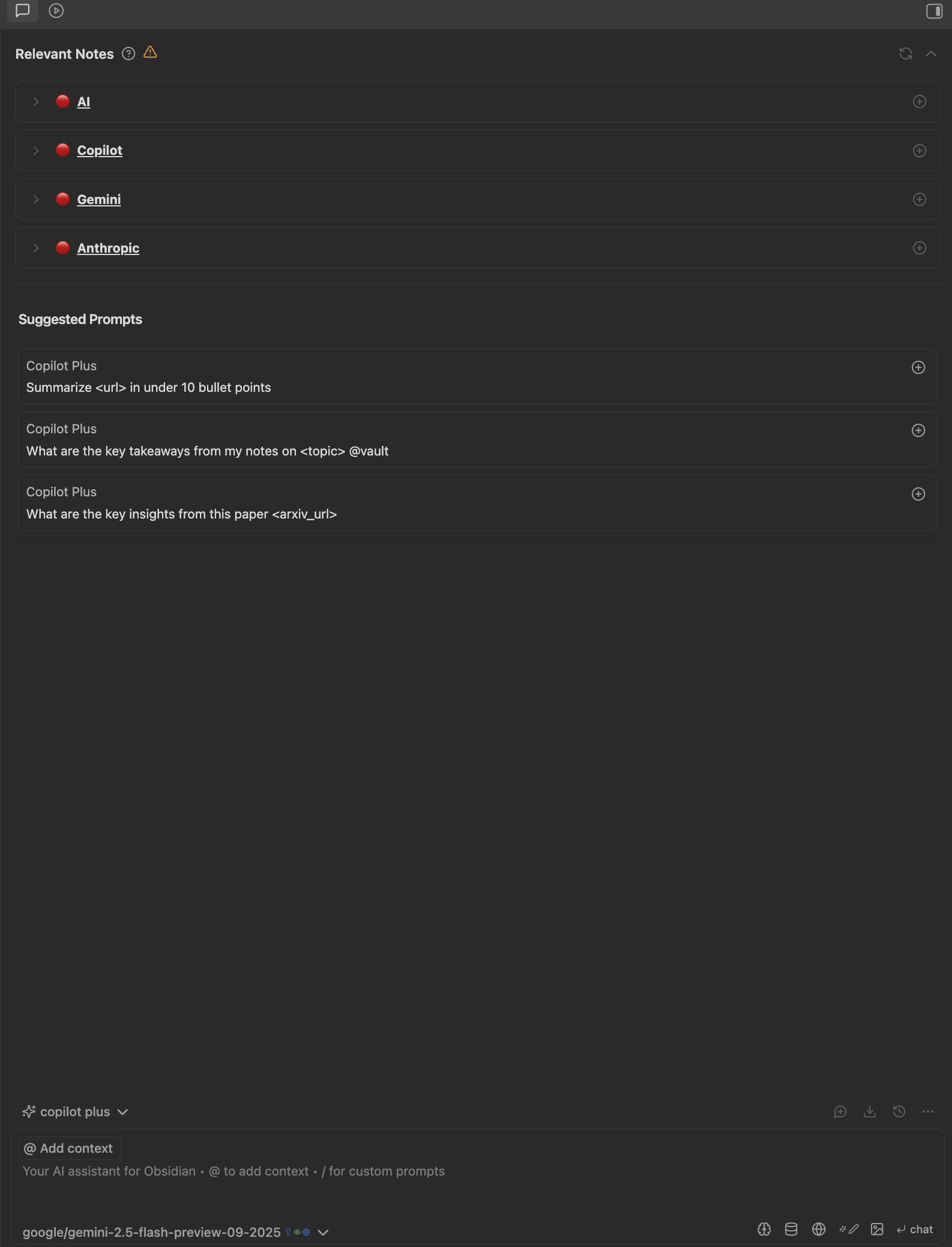
2. Powerful Models and Economic Considerations
In model selection, professional researchers prioritize the optimal balance between performance and cost.
- Aggregated API: It is recommended to use OpenRouter as the model provider, as it aggregates mainstream large models including Gemini, GLM, and Anthropic, offering a unified and economical API interface.
- High Performance and Low Cost: For example, Gemini 2.5 Flash is widely recommended for its superior cost-performance ratio. Even with a daily usage reaching millions of tokens, the cost is only about $3, significantly lowering the cost barrier for Deep Research.
III. AI-Driven Deep Research Workflow and Prompt Engineering
The Core Problem: How exactly does Obsidian Copilot reshape the investment analyst's efficiency in processing research reports, raw data, and unstructured information?
Obsidian Copilot transforms the AI from a simple information summarizer into a "virtual intern" capable of executing complex, multi-step tasks.
1. Structured Reading and Information Filtering
By combining PDF document processing with customized prompts, the AI can perform automated preliminary screening of research reports.
- Preprocessing and Structuring: Integrating plugins like Marker PDF to MD (or OCR.AI) allows converting PDFs (including images) into the Markdown format, facilitating AI readability.
- The Art of Professional Prompting: High-quality, reproducible prompts are the key to a standardized workflow. Analysts should avoid simply asking the AI to "summarize something" and instead clearly define "how to view the content, and what specific information is needed."
- Jason's Prompt Writing Framework:
- Purpose: The objective of the task and the final deliverable.
- Methodology: The rationale and logic for task execution.
- Steps: The specific execution steps (1, 2, 3).
- Example: Providing an example to calibrate the AI's output style and format.
- Notes: Key considerations and limitations.
2. The Revolution in Semantic Search: From Keywords to Concept Matching
Facing a knowledge base potentially containing hundreds of millions of words, traditional keyword search is insufficient. Obsidian Copilot solves this problem through Semantic Search (Hybrid Search), enabled by an Embedding Model.
- Vectorization: The Embedding Model converts the notes within the vault into Vector representations.
- Semantic Matching: When the user poses a question, the question is also vectorized. The AI then searches the vault for the semantically closest vectors, extracts the 15 sources most relevant as context, and then passes them to the AI for answering.
- Precise Localization: This mechanism ensures that even if specific keywords are not directly mentioned in the notes, the AI can efficiently locate the information as long as the concepts are related. For example, it can precisely find details about Restricted Stock Units (RSU) expense from Visa's Annual 10-K filing and provide a link to the original text.
3. Cross-Media Information Acquisition: YouTube Transcription and Text-Image Integration
Obsidian Copilot can retrieve YouTube transcripts for all English videos and Chinese videos that have submitted captions.
- Skipping Redundancy: Users only need to provide a link; combined with a specific prompt, the AI can quickly extract the core content of the video, eliminating the need to spend time watching lengthy podcasts or interviews.
- Ultimate Efficiency with Text-Image Integration: For presentation slides (PPTs) or content that is heavy on both text and images, Copilot can transform the video content into a "text-image integrated" format, displaying the corresponding keyframe image next to the text. This achieves 100% acquisition and comprehension of the information.
IV. System Construction and the Efficiency Multiplier: Agent Mode and Custom System Prompt
The Core Problem: Beyond individual efficiency gains, how can an architecture be built that enables autonomous decision-making and systematically enforces AI behavior norms?
1. Agent Mode: The AI's Autonomous Decision-Making Capability
Agent Mode is a major update in the new version of Obsidian Copilot, granting the AI the ability to make autonomous decisions and utilize tools.
- Multi-Tool Coordination: In Agent Mode, the AI can simultaneously call upon multiple tools, including vault search, web search, YouTube Transcript retrieval, and Composer.
- Handling Complex Tasks: The AI can independently conduct multi-round iterative searches based on complex research tasks presented by the user (e.g., Deep Research concerning the technical difficulties of ASML's High-NA EUV technology), and then provide comprehensive, integrated answers.
2. Custom System Prompt: Defining the AI's Behavioral Boundaries
A detailed, customized System Prompt is the bedrock for ensuring the quality of the AI's output, behavioral compliance, and formatting consistency.
- Role Definition and Format Uniformity: The System Prompt defines the AI's role, its method of task execution, its thinking process (critical, multi-path exploration), and formatting requirements (image citation, number highlighting, and the use of Wikilinks).
- Entity Tagging and Linking: By instructing the AI to enclose any entity in double brackets (
[[ ]]) to create Wikilinks, even if no corresponding note exists yet, potential connection points are established. This significantly optimizes the organization and retrieval efficiency of the knowledge base.
3. Auxiliary Plugins and Vault Organization Strategy
Other auxiliary plugins and organizational strategies further enhance efficiency.
- Asset Management: The Local Image plugin is used to batch download and store web images locally, ensuring the perpetual validity of image asset ownership and links.
- Image-to-Text Conversion: The Visual Recall plugin enables the AI to analyze valuable images and generate readable text description notes. This allows Copilot to find and understand this non-textual information through semantic search.
- Organizational Structure: An efficient knowledge base typically organizes content by area, combining Wikilinks and Tags. This allows Copilot's Relevant Notes function to efficiently rank relevance through the Embedding Model and keyword matching.
Conclusion: The New Balance of Efficiency and Rigor
The deep integration of Obsidian and AI offers a powerful, highly customizable research environment. It achieves two critical goals in knowledge management: data sovereignty (through "File Over App") and the efficiency multiplier (through Markdown and full-context AI).
The AI's capability boundary covers almost all text, data, and image processing tasks conducted on a computer. However, this leap in efficiency is not unconditional—the core prerequisite is the analyst's ability to possess the capacity to clearly and meticulously define the workflow, namely, guiding the AI's behavior through Prompt Engineering. Only within a framework of rigorous logic and critical thinking can AI truly become a powerful tool for investment analysts to expand the depth and breadth of their research.


