

My AI Stopped Chatting and Got to Work
What happens when you give an AI agent — not a chatbot — the keys to your entire knowledge vault?

Two weeks ago, I set out to review Nintendo's latest quarterly earnings. I opened Obsidian, typed a single sentence, and went to make myself a coffee. Forty-five minutes later, I came back to find a complete earnings review — spanning five full sections, from key financial figures and management commentary to Q&A highlights and sell-side comparisons — sitting quietly in my vault. I hadn't typed a single line of it.
This isn't some futuristic vision. This has been my daily reality for the past few months, powered by an Obsidian plugin called Claudian. In this post, I want to talk seriously about the tool that has changed virtually all of my desk work — what it is, what it can do, what it costs me, and why I believe it represents a fundamentally different paradigm of human-AI collaboration.
From Chat to Work: A Subtle Dividing Line
Last year I wrote a piece on how Obsidian Copilot had supercharged my investment research workflow — full vault context ingestion, semantic search, Agent Mode. It was genuinely exciting at the time. But as I pushed deeper, I gradually recognized a fundamental limitation: no matter how clever Copilot's Agent Mode might be, it remains, at its core, a chatbot. You ask a question, it answers. You follow up, it responds. Every step requires you behind the wheel.
For simple tasks — "summarize this note," "translate this paragraph" — that's perfectly adequate. But when the work becomes systematic, say processing a full earnings package containing an earnings release, transcript, sell-side consensus, and analyst review, the chatbot model's bottlenecks surface fast. You have to manually decompose tasks, manually feed materials, manually verify each step's output, manually stitch the final product together. You might call it "AI-assisted work," but in practice it feels more like managing your AI. The critical primitives missing from chatbot mode — Bash command execution, file system operations, external API calls — mean it can never independently complete a complex end-to-end task.
Claudian does something different.
What's Under the Hood
Let me start with the technical facts. Claudian is an open-source plugin created by developer YishenTu. It takes Anthropic's Claude Code CLI — a product that Menlo Ventures' report credits with driving Anthropic to a 40% LLM market share — and embeds it directly into Obsidian.
Your vault becomes Claude Code's working directory. Claude doesn't just "read" your notes. It wields a complete agentic toolkit: file read/write/edit, Glob and Grep for vault-wide search, Bash command execution, external API access via MCP, and a Subagent mechanism that decomposes complex tasks into parallel sub-tasks. It also has vision — it can literally see and analyze charts, screenshots, and images embedded in your notes.
Put differently, your vault transforms from a place where you record information into a place where AI works.
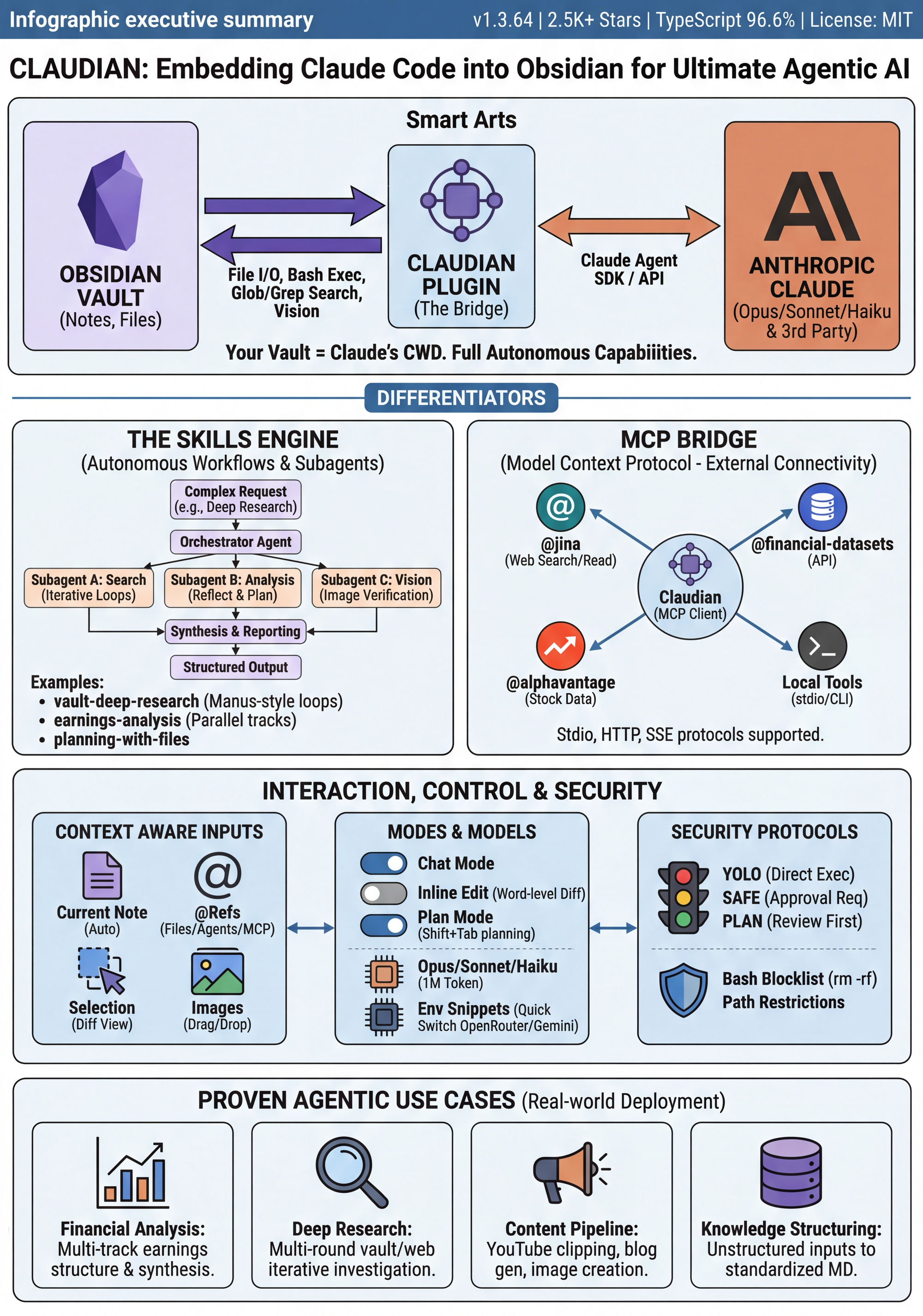
Claudian System Architecture Overview
source: Jason & Jarvis
The diagram above captures the full landscape. On the left: core agentic capabilities — file operations, Bash execution, search, multi-step orchestration, and context window management. On the right: the extension ecosystem built on Skills and MCP. The two workflow diagrams at the bottom illustrate how these atomic capabilities get orchestrated into complete end-to-end processes — the iterative search loop of Deep Research and the parallel processing pipeline of Earnings Analysis.
Context awareness forms the system's foundational infrastructure. Opening a chat automatically attaches the current note as context. Typing @ in the input field lets you reference vault files, MCP servers, or custom Agents. Selecting text in the editor and initiating a conversation automatically includes that selection. Images can be dragged in, pasted, or embedded via Obsidian's native ![[image]] syntax. A feature called Inline Edit goes a step further — select a passage in your note, hit a keyboard shortcut, and Claude edits the text in place with a word-level diff preview. Polish a paragraph, reformat a section, translate content. All without leaving the editor.
Agent vs. Chatbot: A Fundamental Distinction You Need to Understand
This isn't a rhetorical distinction. In a recent video, I used an analogy: if you handed ChatGPT the entire Harry Potter series and asked it to list every character Harry has ever met, it would almost certainly miss some. Not because the model isn't smart enough — but because of the structural limitations inherent in one-shot mode. Pouring a massive volume of information in and expecting a flawless output in a single pass is an assumption that simply doesn't hold.
An agent approaches things differently. Faced with the same task, a well-designed agent automatically decomposes the problem into sub-tasks, dispatches different sub-agents to handle different portions, aggregates their results, then cross-validates and fills gaps during the consolidation stage — iterating through two to three rounds of checking before delivering the final output. The difference this makes in real-world work is enormous.
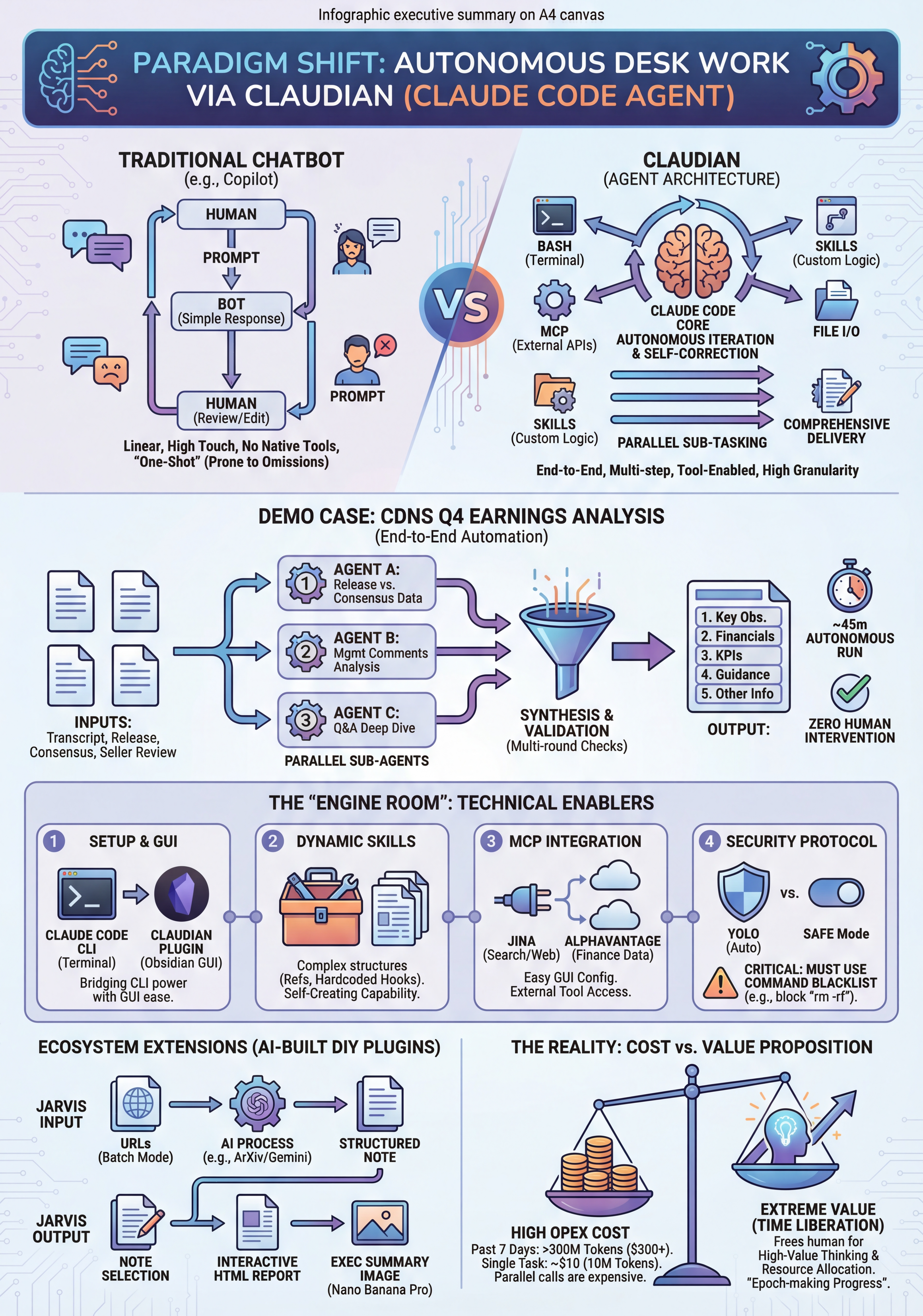
Traditional Chatbot vs. Agent Architecture
source: Jason & Jarvis
The diagram above illustrates the contrast between two paradigms. On the left: a traditional chatbot's linear interaction flow — Human Prompt → Bot Response → Human Review/Edit. Essentially two parties having a conversation. High-touch, prone to omissions, no native tool-calling capability. On the right: Claudian's agent architecture — Claude Code as the core engine, autonomously invoking Bash, MCP, Skills, and File I/O, delivering end-to-end results through parallel sub-tasking and multi-round self-correction. The CDNS Q4 Earnings Analysis case in the center shows how a real task was decomposed across three parallel agents and synthesized into a complete deliverable — roughly 45 minutes, zero human intervention.
Teaching an Agent Your Job
Having tools doesn't mean doing good work. A fresh-out-of-school analyst can use Bloomberg Terminal and Excel too, but the quality of output depends on what methodology they've been trained on and what frameworks they've internalized.
Claudian's Skills system is that training process — and it's the plugin's core differentiator. Skills are not simple prompt templates. A mature Skill contains a main logic file (SKILL.md), step-by-step reference prompts (references/), code hooks (hooks), templates (templates/), and examples (examples/). Take my earnings-analysis Skill: its reference directory holds eight standardized prompt files defining every step from earnings release structuring and management comment extraction to Q&A synthesis and final multi-source consolidation. Its hooks contain programmatic logic ensuring certain critical conditions must be met before advancing to the next phase.
The key design insight here: steps requiring deterministic guarantees (e.g., "must complete at least three iteration rounds before stopping") are written as hard-coded program logic, while steps requiring flexible judgment (e.g., "what is the core thesis of this management comment?") are left to the model. Determinism and flexibility, each in its proper place. If you leave a critical condition entirely to the model's discretion, there's always some probability of error. Hard-code it as a programmatic constraint, and it becomes infallible.
I currently have seven custom Skills configured, covering the main scenarios of my daily workflow: earnings-analysis (a multi-step parallel earnings analysis pipeline), vault-deep-research (Manus-inspired vault deep research with a minimum three-round search-reflect-iterate loop), online-deep-research (internet deep research powered by Jina MCP with a five-tier source credibility assessment), planning-with-files (a file-based planning system that treats the context window as RAM and the file system as disk), gemini-image-gen (infographic and cover image generation via Google Gemini API, supporting four modes), youtube-clipper (AI semantic video clipping with bilingual subtitle rendering), and daily-news-search (daily news aggregation outputting as interactive HTML pages).
These Skills can be created through direct conversation with Claudian — it even comes with a built-in skill-creator Skill, a Skill for making Skills. You can also install them from GitHub, or simply paste a GitHub URL into the chat and let Claudian download and install it automatically. The System Prompt serves as another layer of customization, defining the agent's role identity, behavioral guidelines, formatting standards, and vault structure description. A good System Prompt only needs to answer two questions: what kind of context will you provide, and what are your expectations.
In Practice: A 45-Minute Earnings Analysis
Let me walk through a concrete example of what this system looks like in action.
When I needed to process Cadence Design Systems' Q4 FY2025 earnings, the input materials comprised four documents: the earnings call transcript, the official press release, sell-side pre-release consensus estimates, and post-release analyst reviews. I @-referenced these files and told Claudian to begin the analysis.
Everything that followed was fully automatic. The system first decomposed the task into three parallel sub-agents: one handling the official release versus consensus comparison, one processing the management commentary section of the earnings call, and one tackling the Q&A. All three launched and ran simultaneously. Upon completion, the system automatically advanced to the next stage — merging the two call sub-tasks into a complete Earnings Call Overview. Next, consolidating all official information (release + call + consensus). Final step: merging the official synthesis with sell-side reviews. Each intermediate output underwent two to three rounds of internal iteration checks, verifying there were no data omissions or formatting errors.
The final deliverable contained five sections: Key Observations, Key Financial Figures, Segment & KPIs, Outlook & Guidance, and Other Important Information. It included sell-side chart references, distilled Q&A highlights, and guidance-versus-consensus comparisons. Total elapsed time: approximately 45 minutes, nonstop, zero human intervention.
One point worth highlighting: the decomposed approach isn't solely about improving accuracy. Each intermediate output has standalone value. When I later want to track how management's tone has shifted across the last several quarterly earnings calls, those detailed structured notes from each step are readily searchable and citable. The granularity often exceeds what I'd produce manually — a fact that has genuinely surprised me.
Connecting to the Outside World: MCP
An agent confined to the local vault has a ceiling. Claudian extends Claude's reach to the outside world through MCP (Model Context Protocol).
In a previous piece on context engineering, I mentioned that Anthropic's MCP protocol has been compared to "USB-C for AI" — a standardized interface for tool integration. In Claudian, configuring MCP is far simpler than in Claude Code CLI or Claude Desktop: copy a JSON configuration → click import from clipboard → parameters auto-populate → done.
I currently have four MCP servers configured: Jina (web search, page reading, screenshots, academic search — 20 tools in total), AlphaVantage (stock market data API), Financial Datasets (financial statements, SEC filings, and more), and a custom quantitative tool. Activating any of them in chat is as simple as typing @ followed by the server name. This means when the online-deep-research Skill runs, it doesn't just search notes inside the vault — it can simultaneously search the live internet via Jina, read full web pages, query ArXiv for academic papers, then consolidate all findings into a richly illustrated research report.
The output quality of deep research surpasses what ChatGPT or Google Gemini's built-in Deep Research delivers. The reason is straightforward: it can handle text and images simultaneously, inserting relevant charts and visualizations in the right places, and the report length can reach tens of thousands of words — unconstrained by single-conversation limits.
Context Engineering, Realized
If you've read my earlier post on context engineering lessons from the Manus team, you'll find that Claudian's design implements those principles almost perfectly.
"File system as external memory" — the vault's notes serve as the agent's long-term memory, while the state files created by the planning-with-files Skill (task_plan.md, findings.md, progress.md) represent working memory persisted to disk. "Intelligent tool management" — Skills and MCP activate on demand rather than loading everything at once. "Active attention guidance" — the System Prompt defines what the agent should focus on, what to ignore, and what format to output in.
My vault-deep-research Skill is the most concentrated embodiment of these principles. The main agent serves solely as an orchestrator. All actual work is distributed across five specialized sub-agents: a Search agent using Glob/Grep/Read to scour the vault, a Reflect agent analyzing all findings and identifying information gaps, a Synthesis agent distilling core arguments, an Image Verification agent validating candidate images for usability, and a Report Writer agent composing the final report in a fresh context window. The main agent's context window stays minimal; heavy retrieval and analysis are offloaded to each sub-agent's independent context. This is precisely the "context is the most precious resource and must be carefully managed" philosophy the Manus team emphasized — put into practice.
A decision matrix governs when the entire research workflow is allowed to conclude: at least three search rounds completed + all sub-agents returned successfully + information saturation (no new findings for two consecutive rounds) + all angles covered + candidate images verified. Every condition met. Only then does the system advance to the report-writing stage.
An Honest Cost Ledger
It wouldn't be honest to get this far without talking about costs.
Over the past seven days, my Claude consumption — measured in equivalent API costs — exceeded $300, burning through more than 300 million tokens. A single complete earnings analysis (like the Cadence Design Systems case above): roughly 10 million tokens, costing approximately $10. Parallel sub-agent invocations mean each agent internally chains a long sequence of API calls, so token consumption adds up fast. Fortunately, I'm on the Claude Max plan.
Yet I still consider it a good deal. Under the traditional approach, a high-quality earnings analysis demands at minimum two to three hours of focused effort — reading materials, extracting data, cross-referencing, structuring output. Now, during those 45 minutes of agent runtime, I can do something else entirely: read other materials, discuss ideas with colleagues, or simply think through my next investment judgment.
When AI's role shifts from "an assistant you need to supervise" to "a delegate you hand tasks to while you do other things," what gets liberated isn't manual labor — it's attention and time. For an investment analyst, attention is the scarcest resource of all.
Final Thoughts
Thousands of agent sessions have taught me that this system's value lies not in any single flashy capability, but in a new rhythm of work: you define rules and standards (System Prompt + Skills), provide materials, and let the agent execute. Your role shifts from executor to supervisor and architect.
This is what happens when you give an agent — not a chatbot — the keys to your entire knowledge vault. From automated earnings analysis to richly illustrated deep research reports, from one-click executive summary infographics to daily news aggregation — desk work that once demanded your hands-on attention can now be delegated.
From the start of that video to the end, I barely typed a word. Even the one text command I issued was generated by voice input.
But I don't think this is a story about AI replacing people. Quite the opposite — when you delegate all the mechanical desk work, what remains is the work that truly requires a human: judgment, decision-making, the critical scrutiny of information, and the questions that only you know to ask.
My claudian teachin video in Chinese
I will share my DIY plugins mentioned in above video for my free & paid members:


